This is an old hack I had on my computer. I MADE THIS HACK IN 1.22 (SOURCE IS BELOW) Back in the day people thought this would "kill battle.net" (yea right).
Three modes:
F4: Longloads for 4 min 30 seconds (I think max is 5 minutes before you d/c and lose), customizable. Only press ONCE, as soon as loading starts. F5: Longloads manually until you press F6. Press before or during loading. F6. Longload is OFF (won't work if you pressed the F4 mode though).
This is pretty useless and simple, but hey, it's a zmap feature.
Quote Originally Posted by undead_warrior View Post dude Tyrano, i heard rumors that you're the next bendik... I really hope it's ain't so but in these pass few weeks, you're acting more and more like him... WAT THE **** DUDE..?? Quote Originally Posted by hohodyret View Post But he still missing to credit someone.... Quote Originally Posted by Jolinar View Post I second that. This is the kind of shit that makes me want to leave this site for good. I have nobody to credit.
You guys are killing me. This is my hack, I wrote it in 1.22 and I just updated the offset. And no it isn't detected. Who should I give credit to? This is my offset, I found it, wrote the program. How did I get the idea to make it? Some guy on msn told me back in the day to make a hack that pauses loading. I told him it was easy to make and that there were tons of "longload" offsets and methods, made this with hotkeys as it was simpler to use.
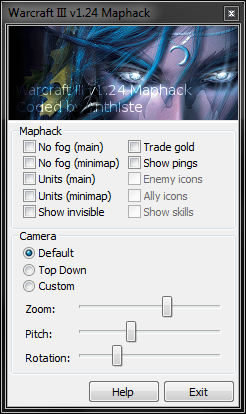
I recently released a namespoofer, and since then I've been working on a maphack. So far it's going ok, but I'm kinda stuck on the more complicated features found in a lot of hacks. Either way, it's completely usable in custom games (I wouldn't advise using this anywhere where a ban is possible). I've decided to release it in its current state, and if I ever add more features, I'll release future versions too.
Once again, I've packed the executable, so if it is detected as a virus, it's a false positive. See the discussion of my namespoofer for details:
Features:
- No fog (main map) - Working - No fog (minimap) - Not yet implemented - Show units (main map) - Working - Show units (minimap) - Working - Show invisible - Working - Camera hack - Working - Enable gold trade - Working - Show enemy pings - Working
Windows XP users:
It should technically now work on XP as well, (it did on my test machine anyways). If it works for you, I'd appreciate a reply to let me know.
Screenshot:
Detectability:
- This does not (and never will) support Garena - This is most probably detected
I don't play on official Blizzard servers or Garena, so I have no way of working around any anti-cheats that they provide. I never will either.
Problems:
I've added error logging code. If you have problems, please post the contents of log.txt here
If your anti-virus program thinks that DreamDota/DreamLoader/DreamCrack are viruses: 1) Turn your anti-virus program off. 2) Download and extract all of the files you need to. 3) Make sure the files are where they need to be (if you move them later, your anti-virus program may complain). 4) Add all of the files that you extracted to your exceptions list (if your anti-virus has this feature). 5) Turn your anti-virus program back on.
Installation 1) Download DreamCrack from this post (at the bottom). 2) Extract DreamCrack files to your TFT folder. 3) Edit DreamDota.ini if you want to change the button hotkeys. For a list of possible keys, see Keycodes.txt.
DreamDota should now be automatically started when WC3 starts.
History v9.5: -Fixed another major crash bug.
v9.4: Fixed a bug that prevented WC3 from running if the "Frozen Throne.exe" or "Warcraft III.exe" executables were used (as opposed to "war3.exe").
v9.3: -Fixed a major crash bug.
v9.2: -Fixed a bug that preventing DreamDota.ini from being read at all (whoops). -If DreamDota.ini can't be read, it will now use the normal default keys (tab and ~). -Fixed a bug that caused the login screen to show up occasionally.
v9.1: -Now works for all versions from v1.24b to v1.24e -No longer requires administrator privileges -No longer need to be loaded every time WC3 is started -Removed the login screen -Added a config file -Fixed several other bugs that caused the crack to fail
When using v9.4 or earlier, use the following bug workaround method: 1) Load Garena (if that's where you want to play) 2) Start WC3 3) Click "Single Player" then click "Custom game". 4) After step 3, you can go ahead and play WC3.
Some things have changed, please see the full list of changes to the official website.
How can I use? You can take the hack you need to register for free. To do this, click on "Save" button at the court of the login. They are on a page where you can submit the form to be redirected. Those who registered the previous version need not register again. Just use the same username and password.
In the new version to change some things. MH Cqccyh links and new features, including the possibility that you know that if you chat hack, and not just "a scourge. All these things can be seen in the resources page.
Version of the button, is now in Version detected automatically. Papers 1.20, 1.21, 1.24c, 1.24d version 1.24ey.
In others, many thanks to all who waited patiently, especially in those who still use the older version Garena lives.
You can easily hack the update on the links above (UO Easy-Share 4shared SendSpace).
Features: 1 - Make all symbols 2 room with no windows and Anna advertising 3-screen real table instead of the bar (in room, game occurred Thursday anyone UR) 4 spam messages in the channel has a cat EXP increased 5-10 times, they keep it open, Garena, you can get Level 6-Unlimit Watch Group, also a full member Generation-9 1.20 1.21 1.24 / 1 v. 24d Maphack s-function 12-trace the IP address of the population 15 updates on Garena Garena later and later hack 16 - you can leave the room during the game 17 - is seen as a series of Platinum or the host 18 - War3 name can be changed arbitrarily 19 - the player can watch the game space and the inclusion of a list of members, as well as rooms with facilities and high rates may be revised in 1920 in the profit and loss account 21st May have a significant high camera Dota functions: 1922 CUSTOM KICK (kicking and Him) £ 23 (DELAY of influence on players and not the others) £ 24 can be silent or mute a player see 25 computer opponents, IN 1926 poem comes SMS alerts, which describes the Rune down a bit, and even a ping minimap shows a different kind of color runes depond 27 Maphack Detector 28 to give the public a resource 1929 torrent Kunkka see snipers in the final, while charging SB games, etc. 30 bars from the mana 31 Click safe - protecting jerky fog detection (including repeat) See below 32 units invisible gray bar.
Good morning. Today I have decided to participate in this forum, and it was time.
Since I'm new here, I will start a program for a month, including:
) Custom KICK (kicking or him) 2) Hack delay (delay of some players and have no effect on the others) 3) hack you can turn off or silence Team 4) can read an opponent cat 5) show, a poem: It is a text that describes Rune down a little, and the table is 6) is characterized minimap color depond other country 7) Maphack Detector 8) gives the browser a resource 9) you can see, hear Kunkka has the shooter SB Shop, etc. During the game 10) Mana bar 11) Click Safe - protecting jerky fog detection (including repeat) 12) See the gray bar hidden units
Note: I sold the program and came to 150 people. Downloads: top.
DotA Crisgon Toolbox - Toolkit for Advanced Warcraft 3 Dota
Crisgon DotA Tools Below is developed an impressive set of tools, DotA Crisgon. Basically it is a standard toolkit Warcraft 3, but some are especially designed for advanced addons DotA. This program is almost all public services should be a player during the game DotA. These features include how amazing CustomKeys SPF breeder meep Bot Bot Summoner and others.
Now players must not open a number of programs for different activities, because this program has it all!
DotA Crisgon Toolkit features:
Tools Warcraft 3% u2022 Crigson list of keyboard shortcuts You can define keyboard shortcuts for all the stocks Warcraft 3 keys.
Bind mouse wheel% u2022: You can set a keyboard and mouse wheel.
% U2022 autocast skills and Selfcast. This allows you to specify the desired shortcut key skills and then use the option "Auto-cast and Selfcast.
% U2022 CustomKeys Warcraft 3 sort keys () Functions to create and can CustomKeys.txt Spell (skill) and other means of transport. For example: Q, W, E, R, etc.
DotA Crigson ToolkitNote: the key to the game Warcraft 3 seats to make it work.
% U2022 Summoner Super Keys (Summoner Bot) This may allow you to bind hotkeys to Summoner Skills (do Summoner spells by pressing a button to do)
Meep% u2022 Super Keys (meep-bot)
Hmph first start: Bind the key to all clones meep Ottoman, Turkish geomancer their origin.
Another Earthbind Bot This function automatically selects the next post-merger Earthbind meep, you activate the link.
% U2022 short message: Only the spammers .Games for children, allows you to send a message of this manual to enter the key.
Tip: You can use the code, for example, All: "Your text here" - is the entire message. Our "Your text here" - he sends his allies.
Fast% u2022 At the beginning of the other selected program or copy and paste the path and click on the market.
% U2022 Health Bar / CustomKeys You can use the health bars and CustomKeys change or turn off during the game, you use the keyboard shortcut.
% U2022 resolution changes: You may want to change the resolution Warcraft 3 This is the users of public display, resolution should not appear in the film, in accordance with the regulations.
% U2022 improve FPS: This will improve the Warcraft 3 frames per second, so you can play without problems.
Warcraft 3% u2022 Field: Play Warcraft 3 in windowed mode, no problems with the cursor. Download:.
Wynthar's DotA Invoker Auto-Hotkey Script Version 3
Okay, so version three! Man. I have just spent many hours writing this script. I really don't feel like making a tutorial. But, I'm so happy with the way the script turned out ath I'm going to try to create a nice looking well rounded tutorial to support the script.
Credits kill5link : Code for turning on and off the script in chat rooms/hitting enter/escape. CerberPl : Pointed out a major flaw in my last script which made this script so much better. Valarauka : Got some stuff for version one, including the Enter key to toggle.
Newest Feature So, the thing that I spent hours on this revision is the ability to "remember" which spell or spells are currently invoked. The first tactic I used was to detect what the current spells were by grabbing a pixel at a point of the screen for the spells. I realized I had to get a different color for the spell if it was on the left side or the right side. I also realized I had to get a different color if the spell was currently in cooldown. So, I spent perhaps an hour writing up some code to detect the colors, then one by one I had to cast each spell, get the color, cast next spell get the color, invoke next spell. You get the idea. Eventually it was kind of tricky to get a few of the spells to be on the right side or the left side in order to record the colors.
After spending a long time doing this, I was in window'd mode, and I resized the window. I suddenly noticed that all my colors were off. I did a little bit more experimentation and found out that the colors change at various resolutions. Very upsetting. So I was stumped for a while, but then I thought about something I had seen once. Each time a spell is invoked record it. But there is a problem here too. Because, sometimes the spell doesn't get invoked if the invoke spell is on cool down. So, I grab the colors and determine if the invoke spell actually got casted. If it does, I keep track of the last two spells to be successfully invoked. Rotating in the newly invoked spell and cycling out the spell invoked two times ago. It's working pretty well now.
Known Bug I know already that there will be one bug. The bug is going to be that if you are only at level 1 of Invoke, and you have invoked two spell so far, the script will think that you have two spells invoked. For example, let's say we've only got one level of invoke, and we invoke sunstrike, and then forge spirits. Well, we want to go cast sunstrike again. The script thinks that we have sun strike, since we can have two spells at higher levels. This will fail then when you try to use F7 to cast sunstrike. Until you have two ranks of invoke, you will have to manually invoke sunstrike (7) before you can cast it with F7.
Features:
` Enable the script. You must run this at least once.
F1-F10: Cast Spells (Invoke if needed)
1 - 0 : Invoke Spells
= : rotate current power balls
F11, F12 : click the left and right spots of the invoker spells.
How It Works
In this screen shot: F11 would cast EMP, F12 would cast Sun Strike
"Power Ball" This is the term that I use to refer to the balls that fly around invoker. When you press "E" three times (for Exort) you will see three red balls floating around invoker. You will also notice his damage goes up +3 each power ball. So +9 at level one. If you have trained up to level 7 Exort you will have a maximum of +63 damage if all three "power balls" are red (Exort). This is why it is handy that when the spells are invoked, it reverts back to the "current" power ball. Sometimes you have the Wes power balls set because you want increased move speed. Say maybe you are trying to run away, or get to a battle. Then you want to cast ice wall and keep running, well then it's nice to just press the number 3, and have it invoke ice wall so you have that spell prepared, then it also reverts back to three Wes balls so that you can keep running quickly. Same goes for the other power balls, like with Exort you want to keep the DPS high.
In order to activate your "power balls" for the script to know which set you have, you must use the = key. You can find in the script where this key is mapped and change it if you want. It just is where I like to have it.
Even if you don't have a particular power ball, pressing = will attempt to "press" that button three times. Just press [=] again and it will move to the next "power ball." Hope that makes sense. Just get into a single player game, pick invoker. Type -lvlup 25 and level up his spells and try playing around with the script.
Invoke Spell Keys Pressing the following numbers will invoke the spell, then it will revert back to your current "power ball."
For Example If your current power ball is Quas, and you press the number 5. The script will quickly "Click" the Exort, Exort, Quas button, then Invoke, then Quas, Quas, Quas. This will result in preparing the forge spirits spell, and then going back to your quas "powerball."
Of course you can remap all these keys by changing the letters in the script. Should be easy enough to find. (Hint: *1:: PrepBlast() is where it sets they number 1 to cast the Deafening Blast Spell)
Cast Spell Keys Same numbering sequence, and similar idea to the Invoke spell script. This spell willa ctually cast the spell as well as invoke it if needed. Remember this will have a bug if you only have one rank of the invoke spell. But once you have the second rank of invoke spell it works pretty well.
F1 Deafening Blast F2 Chaos Meteor F3 Ice Wall F4 EMP F5 Forge Spirits F6 Ghost Walk F7 Sun Strike F8 Tornado F9 Alacrity F10 Cold Snap
Attached code as well. (Obviously rename it from Invoker3.txt to Invoker3.ahk) Downloads:
Dreamdota is an advanced micro tool for Dota Allstars. Can be used on Battle.net and Garena.
You can use free features in multiplayer game, or try out VIP features in single player game without paying. For VIP features, DreamDota is a private hack and is only available when purchased VIP.
Requirements Warcraft III: The Frozen Throne with version 1.24b ~ 1.24e. DotA Allstars map 6.63 ~ 6.67c
Where to download http://get.DreamDota.com Latest version: v8
How to use Download and extract 3 dlls, put them into your warcraft folder. Start game (no matter with exe or with garena), there appears a login window. You can login with VIP account, or click on trial to test.
If you dont see the login window, check your antivirus setting (probably false kill) or contact me on MSN: nachtelfen@hotmail.com
How to buy VIP Price, Payment and contact informations: http://buy.dreamdota.com/
We are in cooperation with Garenahack. You may also purchase it on Garenahack, check the following page: Dream dota - Dota last hit/auto dodge hack
DreamDota Features:
Free Features - UI related functions - Press Pause to turn on / off all functions.
- Hotkey to toggle score board on / off (hotkey: tab)
- Shows hero damage taken / healing value over unit with different colors: white - enemy hero takes physical damage yellow - enemy hero takes critical / spell damage red - your own hero takes damage (toggle feature on/off with hotkey: Home)
- Shows your hero's attack range while holding key (hotkey: ~)
- Camera feature Increase camera distance: hotkey "-" on numpad, max 3000 Decrease camera distance: hotkey "+" on numpad, min 1650 Change angle of attack between normal and vertical: hotkey "*" on numpad
- Unit model improvement: slightly modified several hero's 3d model for easier selection / targeting they are : Venomancer, Atropos, Rooftrellen
- Detection of other player maphack clicking not visible item / rune - Detection of other player exchange gold using maphack
VIP Features - micro related functions
You can define custom key for last hit and score board toggle. By default: 256 (tilde) for last hit, and 515 (tab) for score board. For further informations about key value, please visit: http://www.dreamdota.com/web/2010/05...pping/?lang=en
* Auto last hit / deny hit (default hotkey "~") *
Hold down the key to use auto hit, release it to move freely. Ranged hero only hits targets in its range, melee hero will auto move and hits units within 700 range. Your hero will also last hit towers and neutral creeps
Extra functions while holding down the key: - when an enemy hero enters your attack range, your hero will automatically attack it, but last hit action has higher priority. - if your hero is going to be attacked by creep units, it will try to distract their attack using attack command on a friendly unit for very short time.
* Auto avoiding spells *
- Pudge meat hook - PotM arrow - Windrunner arrow - kunnka torrent - use Kelen's Dagger to avoid Tidehunter's ulti skill if available there will be more in the future !
* Map hacking * unlike many maphacks, these functions are simple but safe and undetectable. Both are default off, you can turn on with key End
- Shows enemy hero location on minimap with ping signal with red or player color depending on ally filter setting - Rune spawn message reports location and type of rune when spawned
* Micro improvements * improves user's action and gameplay.
- Spectre's advanced routing: when Spectre enters no-collision mode, its move action will be reinterpreted as a straight path toward destination.
- Pandaren Brewmaster's auto usage of spells: when your brewmaster uses ultimate skill, the Earth panda will automatically throw bolt to stun an enemy hero (best target) in its spell range. Storm panda will cyclone another (stronger one) enemy hero.
- Storm spirit(raijin) combo: after each spell cast, your storm spirit attacks a best target (enemy hero) within range this will make best usage of 3rd skill ( overloading)
- Shadow shaman's serpent ward surrounding: when you cast its ulti skill: serpent ward to location that is very close to an enemy hero, the action will be adjusted and there is high chance to surround the target directly with wards.
- Advanced 4-units surrounding: whenever you control at least 4 units that have collisions, select them and keep using "(M)ove" command rapidly on an enemy unit, just the same as the common surrounding micro, your each unit goes to the right position and surrounds the target.
IceFrog in my last blog, which published an update on new developments in the next DotA 6.68. As we know, IceFrog ready to introduce a balanced result, a perfect balance between characters is proposed brings communities in the new version of DotA to help. He also said DOTA 6.68 is a video preview on the witch, highlighting new content and changes we will see 6.68
That is, his words IceFrog:
I'm still 6.68. We will post a video preview in the near future to see new content. There are a few new heroes, so that the time to ensure high quality. It is also the current contents of the balance between work and many other improvements and features.
If there is something that can be seen and subsequent amendments, please let me know.
Yes guys, it affects our IceFrog comprehensive, balanced and of course, new episodes of Heroes (, cosmetics, etc.). Be prepared to experience something new dota 6.68, video preview soon!.
BuffMePlz, developer of DotA AI map recently in his blog that he sensing AI known. It is very sad news for DotA community, there has been established that the author of the version of DotA AI map life in the past two years. DotA fans have a great job and thank him for it and good luck in the future!
It is the latest update BuffMePlz:
After much thought and consideration, I decided not to go with the AI Dota maps. My other work got in the next phase of my life, very little interest in DotA, frustration and meets the needs of the community and the community to cope with my absence, I think it's better for me to drive this project and move.
It is nice for two years, and almost all the updates since version 6.49 (This is the sixth 66b crazy now!) How lazyfiend / RGB, said that when he went out, I think this work more fun, the card is for me and is actually a bit difficult.
God, we Tony (Killerbee) turn to take the lead, and he decides, I'll try to help them as much as possible. Otherwise, I hope that my party like the last two years learning the complexity of the engine and the WC3 is the site-specific.
My passion has always been fun bars, and although it develop from time to time to some of the maps on my old blog trademarks and / or the original, so page website and comments will be betrayed by my continued here.
Thanks guys and have fun!
As mentioned above, methionine ask God, Tony (Killerbee) nor DotA AI. I hope that someone start BuffMePlz and Development DotA 6.67c AI and AI 6.68 DotA map.
* Reveal units * Remove fog (full or partitial) * Manabars * TP-reveal * Safe-Click * Reveal abilitys of enemy units. * Different hp-bar color for non-own units. * Show move speed of hero units in tooltip * Press tab to show player resources box. * Ingame maphack settings menu (Game menu --> Options --> Maphack) * Anti-Detection code How To: * Extract all files from the zip archive to your Warcraft root directory. * Close Warcraft if already running * Run WUtil_Loader.exe and wait until Warcraft 3 launches.
Can I get banned for using this?
Currently not. There is some code to hide the hack from Warden. But as always, I can't guarantee anything so use it on your own risk.
Note: It is intended to work only with newest official Warcraft client on Battle.net. So no support for Garena or similar.
only 1.24 Requires: Warcraft III-E, or 1.24 1.24D Garena (3.3 or 4.0 works GarenaM4ST3)
If you want to install
1 - Make sure Garena closed and Warcraft 2 - Click on the drop-hack - MYGarena.Co.CC.rar " 3 - u 2 and the files garena.exe war3.exe 4 - Bad garena.exe ur Garena folder 5 - ur war3.exe bath for a target folder of Warcraft
-How does it work?
1 - NO in Garena Warcraft 2 - u, if the game just opens Drophack 3 - (most), click on the name of the tire
* All pull the ladder does not work
1.24DR * Works 02/24/2010
- "Kick Push is not working at all levels. Make sure that the backup and WC3 War3Hook.dll Garena is, and if you hack for fun, want to ". Downloads :
Everything should be explained by itself. Just extract the archive to some folder and run FunsDotAHack_v1.2.exe Don´t forget to press dropbnet botton!
I really need feedbacks, since this wasn´t tested very wide -> there may be issues. So write exactly what is working and what not and dont forget to mention your OS.
Please dont write comments like "thx sooo niccee" just pressThanks if you like it
I don´t have so much time at the moment, writing a bunch class tests -.-´ So when i got time i will make this thread more detailed with some pics and visual changes. Downloads:
* GarenaGods Hacked Garena 100% Safe Not Causes Ban
V3:Changelog
CrashSender Modified
Default Skin ArmyGreen
Fixed Update Bug
Fixed Room Capacity Bug
Removed Garena Protection
Fixed MTV Asia Bug
About: Older Versions -Game Will Crashed Be4 Reporting -Fixed UnKnow Players Name Problem (in Game) -deleted some ADS
-First Release- *Size Decreased By 1MB *Enter any room without 5 seconds limitation popup *Remove Garena Ads *Change ur name without any problems *mAKES U FEEL lIKE A gold member -SeCond Release- *Ladder Details (Showing u Ping Winning Games .....) *Real time Ping Downloads:
There's much trouble about "Bendiks" bMap, To the honest it is my, renamed hack, but that will stop right now.
I'll release the real aMap right now.
Picture:
You can only activate and deactivate the Hack while Ingame. Activate: Press the "HOME"-Button Deactivate: Press the "END"-Button
Update: v2.0 is Released now.
Changelog:
-- aMap v1.0 -- Beta-Release: MainMap - Remove Fog - Reveal Units - Show Action Buttons - Show Skills - Show StatusQueue - Show Cooldowns MiniMap - Remove Fog - Reveal Units
-- aMap v2.0 -- Added Features: MainMap: - Reveal Invisible Units - Reveal Illusions MiniMap: - Reveal Inivisible Units
War3Lib: Fixed an Issue causing the TextOut function to always use Player 1 as speaker (Now always you speak the On/Off msg, won't be seen by the Enemy)
Credits goes to kolkoo for helping me alot Downloads:
 Maybe someone could need this.
 The program just checks every 5 seconds for thread count and alert you when threads count has changed.