Showing posts with label Dota Allstars Tools. Show all posts

Thursday, March 24, 2011

Warcraft 1.26a Switcher | Warcraft Version Switcher 1.26a Download

Warcraft 1.26a SwitcherGot some trouble when trying update into the Warcraft 1.26a Patch? Or maybe you're not connected to the Battle.net? Warcraft Version Switcher 1.26a is the answer for all of that. You can use this tool to switch your Warcraft 3 version into 1.26a easily.


Download Link


Warcraft 1.26a Version Switcher (34 MB)
Warcraft Version Switcher 1.26a.Zip

If you already got the previous Warcraft Version Switcher, you only need to add the 1.26a zip package and put it on your WVS folder :)

Warcraft TFT 1.26a Zip File (33 MB)
Warcraft TFT 1.26a.Zip

Can't figure out how? Check out the Warcraft Version Switcher Guide.

I hope this post will help you update into the Warcraft 1.26a Patch easily. Good luck!

Thursday, March 17, 2011

Warcraft 1.26a Patch Download | Offline Installation Guide

Warcraft Patch 1.25Patch 1.26a Warcraft Offline Installation Guide. This post is one of the three ways to upgrade into the Warcraft 1.26a Patch , the other is by connect into Battle.net or by using the Warcraft 1.26a Switcher. Check out the download link for the Warcraft 3 TFT 1.26a patch below:


Warcraft 3 TFT 1.25b to Warcraft 3 TFT 1.26a Patch (you must have 1.25b installed)


War3TFT_125b_126a_English.exe (coming soon!)

Warcraft 3 TFT 1.25b Standalone Patch
War3TFT_126a_English.exe (coming soon!)

Wish the above link will let you update the patch 1.26a successfully. But if you still cannot update the patch, try the Warcraft Version Switcher 1.26a.

Enjoy the Warcraft 1.26a Patch!

Tuesday, March 8, 2011

Warcraft 1.25b Switcher | Warcraft Version Switcher 1.25b Download

Warcraft 1.25 SwitcherHaving trouble updating into Warcraft 1.25b Patch? Or maybe you're not connected to the Battle.net? Warcraft Version Switcher 1.25b is the answer for all of that. Using this tool, switched version into 1.25b is really easy.


Download Link


Warcraft 1.25b Version Switcher (34 MB)
Warcraft Version Switcher 1.25b.Zip

If you already got the previous Warcraft Version Switcher, you only need to add the 1.25b zip package and put it on your WVS folder :)

Warcraft TFT 1.25b Zip File (33 MB)
Warcraft TFT 1.25b.Zip

Still confuse? Check out the Warcraft Version Switcher Guide.

I hope this post will help you update into the Warcraft 1.25b Patch easily. Good luck!

Thursday, January 13, 2011

Warcraft 1.25b Patch Download | Offline Installation Guide

Warcraft Patch 1.25Patch 1.25b Warcraft Offline Installation Guide. This post is one of the three ways to upgrade into the Warcraft 1.25b Patch , the other is by connect into Battle.net or by using the Warcraft 1.25b Switcher. Check out the download link for the Warcraft 3 TFT 1.25b patch below:


Warcraft 3 TFT 1.24e to Warcraft 3 TFT 1.25b Patch (you must have 1.24e installed)


War3TFT_124e_125b_English.exe

Warcraft 3 TFT 1.25b Standalone Patch
War3TFT_125b_English.exe

Wish the above link will let you update the patch 1.25b successfully. But if you still cannot update the patch, try the Warcraft Version Switcher 1.25b.

Enjoy the Warcraft 1.25b Patch!

Monday, July 26, 2010

Dota Tool Kit (DTK) - Customize Warcraft & DotA


Crisgon from PlayDota has just made an awesome tools which pack all supporting tools for Dota into one application, the Dota Tool Kit (DTK). The DTK got Invoker and Meepo quick key, key remapping and customkey generator, FPS improvement and more. Read the details below:

FEATURES:

Remap:
-Inventory
-Mouse Wheel
-Skills , Selfcast and Autocast

CustomKeys:
-A quick and easy customkey generator (remember to check "Use customkeys" box)

Guide:
-An easy and quick guide to some heroes (will add them constantly)

Quick:
-Send messages
-Quick launch
-Some configurations for wc3 (widescreen adjustment, improve of fps , wc3 path , healthbars)
-Run wc3 on window with mouse capturer
-A quick explanation of my tool features

Dota Tool Kit (DTK) Download
Dota Tool Kit Version 3.2d GameWebZ (Latest Version)


Don't forget to read the Readme file for the instruction. Enjoy the new tool! :)

Friday, March 12, 2010

Warcraft 1.24e Patch Download | Offline Installation Guide

Warcraft Patch 1.24ePatch 1.24e Warcraft Offline Installation Guide. This is an alternative way to upgrade into the Warcraft 1.24e Patch beside connecting to Battle.net or using Warcraft 1.24e Switcher. You can download the Warcraft 3 TFT 1.24e patch from the mirrow below:


Warcraft 3 TFT 1.24d to Warcraft 3 TFT 1.24e Patch (you must have 1.24d installed)


War3TFT_124d_124e_English.exe (Blizzard)

Warcraft 3 TFT 1.24e Standalone Patch
War3TFT_124e_English.exe (Blizzard)

I hope you will able to upgrade into Warcraft Patch 1.24e after downloading the link above. But if you still failed, try the Warcraft Version Switcher 1.24e.

Enjoy the Warcraft 1.24e Patch!

Thursday, March 11, 2010

Warcraft 1.24e Switcher | Warcraft Version Switcher 1.24e Download

Warcraft 1.24e SwitcherAs usual, updating into Warcraft 1.24e Patch is not easy if you're not connected to Battle.net. Fortunately, the Warcraft Version Switcher 1.24e offers you a way out. With this tool you can easily switched version into 1.24e.


Download Link


Warcraft 1.24e Version Switcher (32 MB)
Warcraft 1.24e Version Switcher via MegaUpload

Already got the previous Warcraft Version Switcher? Then you just need to download the TFT 1.24e zip package and place it on the wvs folder :)

Warcraft TFT 1.24e Zip File (31 MB)
Warcraft 1.24e Zip File via MegaUpload
Warcraft 1.24e Zip File via MediaFire

If you confuse, you can check Warcraft Version Switcher Guide.

Hope this post will help you to update into the new Warcraft 1.24e Patch. Good luck!

PS: Will add another mirror soon, if you have another link, share it here.. :)

Sunday, February 28, 2010

Play Multiple Warcraft 3 Instance on One Computer Using kLoader

Play Multiple Warcraft Patch
Do you ever feel that you want to test certain abilities which need 2 heroes on different side, but you don't have friends for it? Well, i do.. Of course there's always Dota AI map which can help you to do some testing, but we cannot control the enemy AI player as we like. But don't worry, Kolkoo a.k.a Aegis from the D3Scene forums has found a way out. With his tool, now you can play two instance of Warcraft 3 Game on one PC.


Here is what he said about this tool:

You type the full path to war3.exe in the config.txt file as well as any command line arguments you want to use Start W3MultipleLoader and it will Launch Warcraft III for you, you can run as many as you want. Yes the loader modifies the wc3 code but it cleans up after the game is loaded and unloads itself so it should be completely safe to use. Have fun

Download Link
Download kLoader via GameWebZ

How to Setup
==================
1. Open the Config.txt
2. Enter the full path to your warcraft III TFT
3. Save
4. Ready to go

Enjoy it guys! I know some of you will need this tool :)

Source: D3Scene Forum

Thursday, January 21, 2010

Warcraft 1.24d Patch Download | Offline Installation Guide

Warcraft Patch 1.24dPatch 1.24d Warcraft Offline Installation Guide. If you're not able to connect into Battle.net and yet wanna update into the Warcraft 1.24d Patch, you can download the patch from the mirrow below:

Warcraft 3 TFT 1.24c to Warcraft 3 TFT 1.24d Patch (you must have 1.24c installed)


War3TFT_124c_124d_English.exe (HotFile)
War3TFT_124c_124d_English.exe (Blizzard)

Warcraft 3 TFT 1.24d Standalone Patch
War3TFT_124d_English.exe (HotFile)
War3TFT_124d_English.exe (Blizzard)

If you still failed to upgrade into Warcraft Patch 1.24d with those link, i recommend you to use Warcraft Version Switcher 1.24d.

Enjoy the Warcraft 1.24d Patch!

Warcraft 1.24d Switcher | Warcraft Version Switcher 1.24d Download

Warcraft 1.24d SwitcherJust like the previous version, Warcraft 1.24d Patch gives big trouble for players that can't update through Battle.net. Luckily, you still can use the Warcraft Version Switcher 1.24d to switch between the old and new versions ;)

Download Link


Warcraft 1.24d Version Switcher
Warcraft 1.24d Version Switcher via Hotfile
Warcraft 1.24d Version Switcher via MegaUpload

If you already installed the Warcraft Version Switcher, you just need to download the TFT 1.24d zip package and place it on wvs folder :)

Warcraft TFT 1.24d Zip File
Warcraft 1.24d Version Switcher via Hotfile
Warcraft 1.24d Version Switcher via MegaUpload
Warcraft 1.24d Version Switcher via MediaFire

You can check the Warcraft Version Switcher Guide if you never use this tool before ;)

I hope this post can help you to update into the new Warcraft 1.24d Patch. Good luck!

PS: Will add another mirror soon, if you have Rapidshare or MediaFire link, share it here.. :)

Wednesday, December 2, 2009

Warcraft 1.24c Switcher | Warcraft Version Switcher 1.24c Download

Warcraft Switcher 1.24cAs usual, the new Warcraft 1.24c Patch give some trouble for people who cannot update using Battle.net. But fortunately, you can use Warcraft Version Switcher 1.24c to switch between versions ;)

Download Link

Warcraft 1.24c Version Switcher
MegaUpload Link
MediaFire Link
HotFile Link

Or if you already have Warcraft Version Switcher, you only need to download this TFT 1.24c zip package and place it on wvs folder :)

Warcraft TFT 1.24c Zip File
MegaUpload Link
HotFile Link

For more details about how to switch version check the Warcraft Version Switcher Guide ;)

Hope this post will help you update into Warcraft 1.24c. Enjoy!

Friday, August 28, 2009

Warcraft Version Switcher 1.24b Download

Warcraft Patch 1.24bThe new Warcraft 1.24b Patch give some people problems when they failed to update using the Blizzard Offline Patch or they have great replay on different version. But fortunately, you can use Warcraft Version Switcher 1.24b to switch between versions ;) 

Download Link

Warcraft 1.24b Version Switcher
MegaUpload Link
MediaFire Link

Or if you already have Warcraft Version Switcher, you only need to download this TFT 1.24b zip package and place it on wvs folder :)

TFT Version 1.24b Zip
MegaUpload Link
MediaFire Link

If never use it before, check the Warcraft Version Switcher Guide ;)

I hope this will help you update your patch into Warcraft 1.24b Patch!

Wednesday, August 5, 2009

Warcraft Version Switcher Download and Guide (Patch 1.26a, 1.25b, 1.24e, 1.24d, 1.24c, 1.24b, 1.24)

Warcraft Patch 1.24The Warcraft Version Switcher software allow you to switch between 2 or more versions of Warcraft 3 TFT on a single PC. This awesome tools is created by Ugge and updated by Aeyah. The latest Warcraft Version Switcher allow you to switch between your current patch into 1.24,1.25 or 1.26 patch.

Download Link

Warcraft 1.24 Version Switcher
Rapidshare Link
MegaUpload Link

Warcraft 1.24b Version Switcher

Warcraft 1.24c Version Switcher

Warcraft 1.24d Version Switcher

Warcraft 1.24e Version Switcher

Warcraft 1.25b Version Switcher

Warcraft 1.26a Version Switcher

Warcraft Version Switcher Guide
1. Extract the zip file from above link.
2. Check the extracted folder and open "Wvs.exe"


3. A warning message will come out, click ok.


4. Set your Warcraft 3 Folder.


5. The application will be closed. Open "Wvs.exe" again.


6. Click Switch Version Button (first button).
7. Double Click the Warcraft 3 version you want to switch.
8. The Warcraft 3 version will be switched.

Enjoy!

Thursday, June 18, 2009

DotA Theme Manager 4! New City and Highland Themes


DotA Theme Manager Version 4 (DTM 4) is out! While IceFrog released Dota 6.60 with a lot of new content, Infrisios also doesn't wanna lose. He just published Dota Theme Manager 4 along with 2 new themes. The first one is the City theme as you can see in picture above. Pretty cool isn't it? The other one is the Highland theme, the screenshot is below. Here is all the download link and guide to install Dota Theme Manager:

Dota Theme Manager Version 4
DL 1 - Rapidshare (RAR)
DL 2 - DotaThemes (ZIP)
DL 3 - DotaThemes (RAR)


Installation Guide

1. Download the newest version of the DotA Theme Manager
2. Unpack* the file IN your warcraft folder - in most cases C:\Program Files\Warcraft III.
You can find the paths the files should have below!
3. DO NOT move or rename any of the files you unpacked. The path must be: "\Warcraft III\DTMV4\"
4. If you want it on your desktop, create a shortcut of the exe file.
5. make sure both your WC3 and your World Editor are closed!
6. Go!
Note: needs to be 'Run as administrator' under Vista to run entirely properly (thanks to Dagguh for this information!).
*) you need WinRAR to unpack it.

Paths

The DotA Theme Manager uses the following paths for the files:

Warcraft III Folder\DTMV4
-this is the folder you should see when you open your WC3 folder.
In it, you should have:
Warcraft III Folder\DTMV4\DTMV4.exe
-the application itself. Use this executable to start the DotA Theme Manager.
Warcraft III Folder\DTMV4\Data
-the Data-Folder, containing all necessary data the DTM needs to work.
Don't change anything here!

Well, let's play the new Dota 6.60b map with brand new look ;)

Credits: Chal ,thanks for notifying me ;)

Thursday, May 14, 2009

Dota Patcher - Dota-Allstars Patcher (Auto Map Updater)

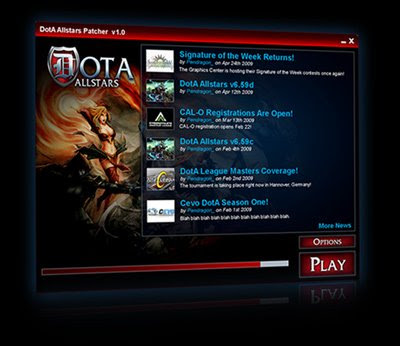
Dota-Allstars Patcher Dota Patcher - Dota-Allstars Patcher (Dota Map Auto Updater). Wow! This new tool has just been introduced on Dota-Allstars forums today. Basically, this tool work as a launcher and can automatically update your Dota Map into the newest version. The details function of the Dota Patcher are described as below:

Features
* Automatically downloads new versions of DotA and displays the changelog!
* Replaces the Warcraft III Icon on your desktop.
* Options to select additional programs (such as ListChecker) to run with Warcraft III.
* Run any combination of programs, (GGC, Banlist, LC, etc) in any order, automatically.
* Displays the latest news from DotA-Allstars.com!

Download link:
Dota-Patcher Download (17.7 Mb)

The Dota Patcher is currently still in development, so there's still some known issues that need to be fixed. Here is the list of current issues at the time i write this post:

Issue: Banlist will not open properly.
Reason: This is because the launcher does not have the ability to stagger program execution, when banlist starts war3 is not fully loaded so banlist complains.
Solution: Implement a delay between program execution
Status: Pending Implementation

Issue: All of the news dates, at least on my system, are listed as December 13, 2003
Reason: News currently is not automatically generated from the dota allstars announcements
Solutions: Ensure news is synced, either through automatic syndication or some other means
Status: Pending Implementation

Issue: A user should be able to have multiple "play profiles" easily selectable
Reason: People may need to change between two or three profiles depending on their current play situation
Solution: Create a way for users to create, manage, and select multiple run profiles
Status: Pending Implementation


Curious? Well, i do. If you already download and tested it, you can share your thought about Dota Patcher here. And if you found problem or bugs, you can post it directly on Dota Patcher sub-forum. Enjoy! :)

Thursday, March 26, 2009

Warcraft III Replay Converter - Patch 1.22 to Patch 1.23

Warcraft III Replay Converter - Patch 1.22 to Patch 1.23Dota Replay Converter from Patch 1.22 to Patch 1.23. After upgrading into Warcraft III 1.23 Patch, a usual problem arise. Yup, we can no longer watch the Dota-Allstars or another Warcraft III game replay which still played with Warcraft 1.22 Patch. On the previous version, i already mention how to Watch 1.21b Replay after 1.22 Patch Installed. Even tough it's not practical, but it works. But, in this version, someone is creating a great tools. With this tools, you can convert your replays with ease and you can see them again.

Here is the download link:

Warcraft III Replay Converter 1.22 - 1.23 via Warcraft Map
Warcraft III Replay Converter 1.22 - 1.23 - Mirror 2

You will need the microsoft .net framework 2.0 to run it, which you can download in this link.

PS: If you haven't upgrade, check this post to Upgrade 1.23 Patch Offline

Source: Battle.net Forum

Thursday, March 19, 2009

Update Warcraft 3 Patch 1.23 Offline - How to..

How to Update Warcraft 3 Patch 1.23 Offline, Download-able. As you know, Blizzard has just released Warcraft 1.23 Patch. Of course, if you can connect to BattleNet server, you will be upgrade with ease automatically. But i believe there's still many of you who cannot connect there and want to update the 1.23 patch offline.

And here is how to Update Warcraft 3 Patch 1.23 Offline:
First, you can check the ftp page for download various version of 1.23 patch on this page and find the downloadable patch that suit your version. But if you are using English (enUS) version, here is the download link to upgrade from Warcraft Patch 1.22 to Warcraft Patch 1.23.

Download Link:
Warcraft Patch 1.23 (enUS version from patch 1.22a to 1.23a)
If you are not using English version, check this page.


You must note that there's a possibility you will failed to patch up and in some condition you must re-install Warcraft 3 TFT and repatch again to successfully upgrade. Please share your experience here as it can help another people who want to patch this too.. :)

Update:
If you failed to update with previous step, try this step. I found it on Dota-Allstars Forums.

These are the three easy steps for you to update your WarCraft III from 1.22 ---> 1.23

Step 1:
Copy your WarCraft III version 1.22 Folder in your Program Files or which directory you have placed it. So if for example you had it this way.

C:\Program Files\Warcraft III
(This is the 1.22 version of WC3, the reason why it is recommended to be copied is because you may not be able to view your 1.22 replays if ever you want to view them. I got loads of replays so yeah.)

copy it then it should be

C:\Program Files\Copy of Warcraft III
(This will be the directory of your 1.23 patch, after doing step 3 rename this folder to whichever name you like but i prefer renaming it to "WarCraft III 1.23")

Step 2:
Download the .dll files and .mpq files for patch 1.23 here - http://www.mediafire.com/download.php?vjvzxyzzfwj

Step 3:
Extract the downloaded file to your newly copied folder. Copy the files inside the folder you just extracted. Paste it on the main WC3 directory(C:\Program Files\Copy of Warcraft III) A message will be asked whether to replace the existing files on your folder, Answer Yes and you're good to go!

I hope this helped you guys! If you find any of these steps unclear feel free to ask. Regards!

-A7X

Thursday, March 12, 2009

Dota-Allstars Database DHG v1.4 & DIG v1.3 (Updated 6.59c)

Dota-Allstars Database
Wow, i actually find this great tools a moment ago but just had the time to post it now. This Dota-Allstars database is really great in my opinion. Very recommended for new player that wanted to learn skills and items details. Even for veteran player that want to know the latest update on items or hero skills, this tools will be handy.

The Dota-Allstars Database program can be download as EXE file or SWF (need Flash Player). The Dota Hero database EXE file size is 14 Mb and on SWF is 10 Mb. The size is not small, but it's worth it. After you download it, you will feel like you have Dota Encyclopedia in your hand. Thumbs up for the creator!

Here is the download link:
Dota Hero Guide v1.4 (DHG v1.4)
Mirror 1 (
14 Mb - DHG v1.4.EXE)
Mirror 2 (
10 Mb - DHG v1.4.SWF)

Dota Item Guide v1.2 (DIG v1.3)
Mirror 1 (
3.96 Mb - DIG v1.3.EXE)
Mirror 2 (
1.62 Mb - DIG v1.3.SWF)

Enjoy this tools, here is the original source from DA forums :)

Tuesday, March 3, 2009

Battle.Net Gateway Editor Download | How to Set New Gateway

Battle.Net Gateway Editor Download. If you're gonna play Dota-Allstars on private server (PVPGN), you will need Battle.Net Gateway Editor to add new gateway. By default, there's only 4 channel on your Warcraft 3 Gateway, you can see it in the picture above. By using this Blizzard Battle.Net Gateway Editor, you can add/modify/remove gateway on Starcraft, Diablo 2/Diablo 2 Expansion and Warcraft 3. 

How to Set New Warcraft Battle.Net Gateway

  1. First download the Gateway Editor from the download link in the end of this post.
  2. After that, put the file into your Warcraft 3 Directory.
  3. Open the file and you will get a window opened like the first picture.
  4. Choose the WarCraft3 tab.
  5. Click add gateway.
  6. Fill with your server information.
  7. Name -> You can fill this with whatever name you want. This will be the gateway name.
  8. Zone -> Fill with number. You can check this on your PVPGN server.
  9. IP -> It can be an IP address like 192.168.1.24 or a domain name like public.indogamers.us 
  10. Click OK, you're done.


Please note that sometime you must exit your Warcraft 3 before the new gateway added appear on the list. Have fun!

Download link:

Warcraft Gateway Editor via Warcraft Map


Popular Posts